




Higher education institutions face unique challenges in managing IT risk due to decentralized organizational structures, growing third-party vendor reliance, and increasing regulatory requirements. Universities must conduct robust security risk assessments, maintain comprehensive IT asset inventories, and achieve compliance with standards like NIST CSF, NIST 800-171, NIST 800-53, CIS, HECVAT, and regulations like FERPA, GLBA, and CMMC.
This guide reviews the best IT risk management software for universities and colleges designed specifically to simplify complex assessment processes, streamline regulatory compliance, and help IT teams improve cybersecurity across decentralized campus environments.
What to Look For in IT Risk Management Software for Higher Education Institutions
| Workflow Capability | Why It Matters for Universities & Colleges |
| Assessment Management | Automates standardized security assessments aligned with GLBA, NIST, CIS, and CMMC, essential for higher education security compliance. |
| Questionnaire Delivery & Completion | Streamlines delivery and completion of security questionnaires, ensuring efficient vendor assessments and internal data gathering across diverse business units. |
| Inventory Tracking | Manages decentralized IT asset inventories clearly, enabling compliance across diverse departments, labs, and campuses. |
| Risk Register & Exception Management | Provides structured tracking and resolution of risks and exceptions campus-wide, ensuring accountability across decentralized stakeholders. |
| Scoring, Reporting & Risk Visualization | Generates compliance and risk reports tailored for higher education frameworks, simplifying regulatory audits (NIST, GLBA, CIS, CMMC). |
| Collaboration & User Experience | Ensures ease of use for diverse user groups (faculty, administrators, IT staff), improving adoption across the decentralized structure typical in higher education. |
| Implementation & Setup | Delivers rapid deployment without heavy resource requirements, reducing reliance on internal IT resources or external consultants for quick compliance readiness. |
The Top 5 Best IT Risk Management Software for Universities & Colleges in 2025
1. Isora GRC
| Category | Details |
| Best For | Universities needing an intuitive, scalable platform to streamline IT risk and compliance across decentralized environments. |
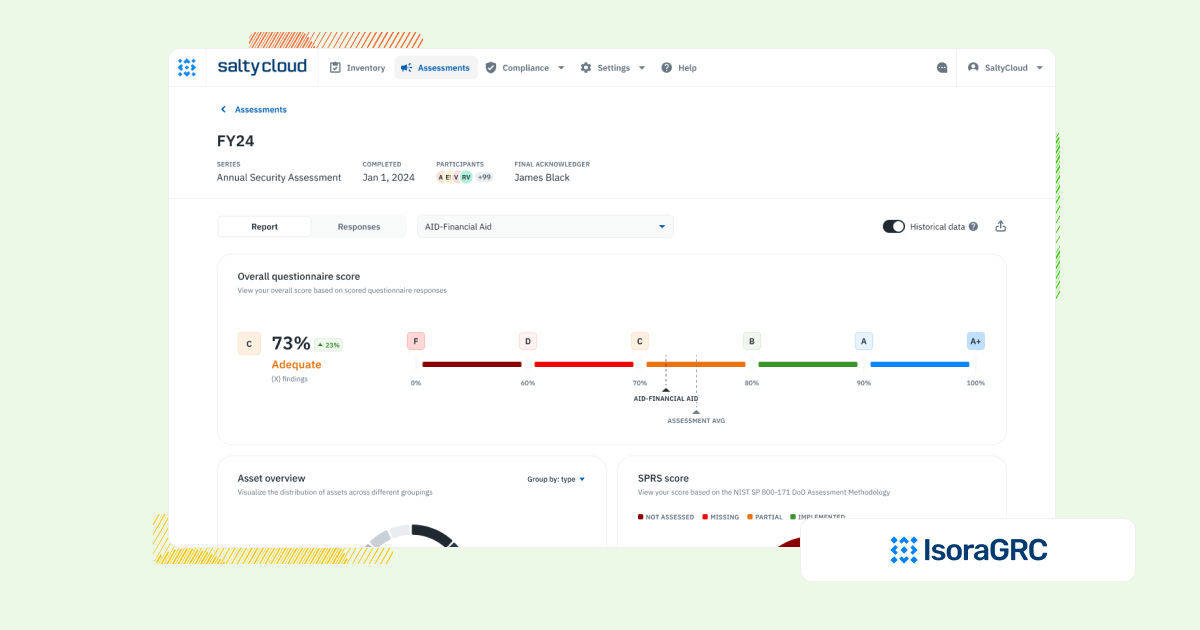
| Overview | Isora GRC is the GRC Assessment Platform™ built specifically for information security teams. Isora GRC simplifies the complexity of university cybersecurity compliance. Designed for higher education, it integrates security assessments, IT asset management, third-party vendor management (HECVAT), and comprehensive reporting for frameworks like GLBA, NIST, CIS, and CMMC. Trusted by 20% of R1 universities. |
| Strengths | Built for workflows, not checklists
✅ Supports assessments, inventory tracking, risk registers, and exceptions in a unified experience. Designed for org-wide adoption ✅ WCAG-compliant UX that requires no training and makes risk everyone’s job. Fast time-to-value ✅ Live in days or weeks, with no-code setup and minimal lift from IT. Flexible by default ✅ Customizable assessments, scalable categories, and framework mapping without heavy configuration. Scales across teams and vendors ✅ Works equally well for internal teams and third-party risk management programs. |
| Limitations | ⚠️ Not designed for legal, audit, or finance teams seeking one platform for enterprise-wide GRC
⚠️ May be too structured for teams looking to build one-off surveys or lightweight audits without repeatable workflows |
| When to Consider | Ideal for higher education institutions transitioning from spreadsheets or legacy platforms, seeking user-friendly, collaborative IT risk management. |
2. Archer IRM
| Category | Details |
| Best For | Large universities with centralized governance teams and the resources to manage a complex, highly configurable GRC platform. |
| Overview | Archer IRM is a traditional enterprise GRC tool used across industries, including education. It offers detailed governance and risk controls but often requires long implementations, dedicated staff, and extensive configuration, making it harder to use across decentralized academic environments. |
| Strengths | ✅ Supports in-depth reporting and governance workflows for large institutions
✅ Can be tailored to manage GLBA Safeguards Rule, NIST 800-53, and other higher ed-aligned frameworks |
| Limitations | ⚠️ Long setup times and steep learning curve for IT and security teams in decentralized organizations
⚠️ IT and security risk ships as a prebuilt use case that is configured to your process during scoping |
| When to Consider | If you need deep customization and enterprise-wide risk tracking, but can work around the heavy configuration and limited usability for decentralized university teams. |
| Other Comparisons | Archer IRM vs ServiceNow GRC vs Isora GRC
LogicGate vs Archer IRM vs Isora GRC ZenGRC vs Archer IRM vs Isora GRC |
3. OneTrust
| Category | Details |
| Best For | Higher ed institutions focused on privacy, consent management, and third-party oversight. OneTrust also lists IT Risk Management. |
| Overview | OneTrust is known for its privacy and third-party risk tools. It offers broad compliance coverage, and it also lists IT Risk Management and an evergreen asset inventory. HECVAT templates are not stated on OneTrust’s published surfaces as of September 2026. |
| Strengths | ✅ Covers global privacy laws and vendor compliance, helpful for institutions with international research or data sharing needs
✅ Supports third-party compliance tasks with out-of-the-box templates |
| Limitations | ⚠️ Internal risk assessments, an evergreen asset inventory and owner-assigned tracking across internal and external teams are listed. OneTrust’s Tech Risk and Compliance page says UI-driven configuration simplifies configuration updates without the need for IT resources, as of September 2026
⚠️ Workflow customization can be challenging, and user interface may deter adoption across university departments |
| When to Consider | If your university prioritizes privacy and vendor tracking. OneTrust also lists IT risk assessments and an evergreen asset inventory. |
| Other Comparisons | OneTrust vs ServiceNow GRC vs Isora GRC |
4. ZenGRC
| Category | Details |
| Best For | Universities focused primarily on audit readiness for frameworks like SOC 2, NIST 800-171, or GLBA. ZenGRC also lists a Risk Management module. |
| Overview | ZenGRC is a well-known, audit-focused GRC tool built to help teams track controls and evidence. It is relatively easy to launch, and it also lists a Risk Management module with automated workflows, risk reporting and a heatmap. |
| Strengths | ✅ Easy to implement for common compliance needs like GLBA, NIST CSF, and CMMC
✅ Helpful for organizing audit documentation and tracking evidence |
| Limitations | ⚠️ Risk management and control assessment modules are listed. ZenGRC’s frameworks page says it can help take an inventory of all the systems that control data assets, as of September 2026
⚠️ Lists Risk Management and Vendor Management modules with automated workflows and vendor questionnaires |
| When to Consider | If you’re looking to centralize compliance evidence for audits. ZenGRC also lists Risk Management and Vendor Management modules with vendor questionnaires. |
| Other Comparisons | ZenGRC vs AuditBoard vs Isora GRC |
5. Eramba
| Category | Details |
| Best For | Technical teams in universities seeking a low-cost, open-source GRC tool and willing to do significant setup work themselves. |
| Overview | Eramba is a budget-friendly, open-source GRC platform offering basic tools for risk, policy, and compliance tracking. While flexible, it requires heavy manual configuration. Its template library includes a HECVAT Full 3.6 questionnaire, an earlier version than the current HECVAT 4. Its package list includes NIST 800-53 and has no GLBA Safeguards Rule package. |
| Strengths | ✅ Open-source and affordable for small security teams or research groups on limited budgets
✅ Allows for self-hosting and customization by technical users |
| Limitations | ⚠️ Steep setup curve, with risk management, online assessments, automation and questionnaire templates also listed
⚠️ Owner assignment, scheduled audits and a CMMC 2.0 package are listed. GLBA and FFIEC packages are not in its published package list |
| When to Consider | If your university needs a low-cost platform for basic compliance tracking, and has the time and expertise to handle setup, support, and scaling independently |
| Other Comparisons | Eramba vs Archer IRM vs Isora GRC |
What Our Customers Say About Isora GRC
Security teams at top institutions are using Isora GRC to replace legacy tools and manual processes with intuitive workflows and actionable insight.
SaltyCloud makes Isora GRC, one of the products compared here. The assessments are our own, so confirm current features and pricing with each vendor before you decide.
FAQs
What is the best IT GRC tool for higher education to streamline cybersecurity compliance?
Isora GRC is built for information security teams running assessments across departments, systems, and vendors, and higher education is where most of its customers are. It simplifies security risk assessments, manages decentralized IT asset inventories, and automates vendor assessments using standardized frameworks such as HECVAT. It also supports compliance with GLBA Safeguards Rule, NIST 800-171, NIST 800-53, CIS, and CMMC.
How can universities conduct IT risk assessments across decentralized campuses effectively?
Universities benefit from using specialized IT risk management software like Isora GRC, which automates security questionnaires and assessments, tracks IT risks centrally, and simplifies third-party vendor management—essential in decentralized campus environments for meeting regulatory standards (GLBA, NIST 800-171, HECVAT).
Why do universities need specialized IT risk and compliance software instead of general-purpose risk tools?
Higher education institutions require specialized software because of their complex, decentralized structures and specific compliance obligations. Tools like Isora GRC provide targeted capabilities for security assessments, IT asset management, and vendor risk tracking aligned explicitly with frameworks such as GLBA Safeguards Rule, NIST standards, and HECVAT questionnaires—unlike generic risk tools.
What is the role of HECVAT in university third-party risk management?
The Higher Education Community Vendor Assessment Toolkit (HECVAT) standardizes how universities assess third-party vendor cybersecurity risk. Platforms like Isora GRC integrate HECVAT-based security questionnaires directly into automated workflows, simplifying third-party risk assessments and streamlining ongoing vendor risk management across campuses.
How do higher education institutions ensure compliance with GLBA Safeguards Rule and NIST cybersecurity standards?
Institutions rely on specialized IT risk management platforms like Isora GRC to automate compliance with GLBA Safeguards Rule and NIST frameworks (NIST CSF, 800-171, and 800-53). These platforms simplify the process of conducting security assessments, tracking compliance across decentralized departments, and preparing for regulatory audits.
What features should universities look for in an IT risk assessment and compliance software?
Universities should prioritize intuitive user experiences, centralized yet decentralized-friendly IT asset inventories, integrated security questionnaires (such as HECVAT), comprehensive vendor management, and alignment with cybersecurity frameworks used in higher education (GLBA, NIST 800-171, CIS, CMMC). Isora GRC is a prime example of a platform designed to meet these precise needs.
How do universities typically prepare for audits using IT risk management platforms?
Universities leverage IT risk management platforms such as Isora GRC to automate evidence collection, centralize compliance documentation, and streamline vendor assessments. This structured approach makes regulatory audits, including those aligned with GLBA, NIST frameworks, and third-party security (HECVAT), less burdensome and more efficient.
For a framework to evaluate GRC platforms before a demo, download our GRC Buyer’s Guide for Information Security Teams.

This content is for informational purposes only and does not constitute legal or compliance advice. See our full disclaimer.
