





 Table of Contents
- NIST CSF Controls and Categories: Complete Reference Guide
- What Are NIST CSF Controls?
- NIST CSF Three-Level Hierarchy
- Complete NIST CSF 2.0 Controls List
- How Many Controls Are in NIST CSF 2.0?
- NIST CSF Physical Security Controls
- Access Control in NIST CSF
- NIST CSF on AWS
- NIST CSF on Azure
- Mapping CSF Controls to HITRUST
- NIST CSF Controls Mapping Spreadsheet
- How to Simplify NIST CSF Compliance
- Key Takeaways
- NIST CSF Controls FAQs
 Subcategories to controls in NIST 800-53, 800-171, ISO 27001, CIS v8, and SCF. See what your existing security program already covers before doing any new work.](https://www.saltycloud.com/wp-content/uploads/2026/04/img-cover-csf-crosswalk-featured.png)
NIST CSF Controls and Categories: Complete Reference Guide
The NIST Cybersecurity Framework (CSF) organizes cybersecurity risk management into a three-level hierarchy of functions, categories, and subcategories.
- Functions sit at the top and define the broadest cybersecurity objectives, such as Govern, Protect, or Detect.
- Categories sit in the middle and group related security outcomes within each function, such as asset management or access control.
- Subcategories sit at the bottom and define the specific security outcomes organizations implement. When practitioners say “NIST CSF controls,” they are referring to subcategories.
For a detailed breakdown of how functions and tiers work together, see our guide to NIST CSF core functions and tiers.
NIST CSF holds the highest cybersecurity framework adoption rate at 54% globally, according to the 2025 Fortra State of Cybersecurity Survey. This reference guide explains what NIST CSF controls and categories are, how they are structured across the framework, and how they apply in practice. It includes the complete controls table organized by function, physical security mappings, access control details, cloud-specific guidance for AWS and Azure, a HITRUST crosswalk, and a downloadable mapping spreadsheet.
What Are NIST CSF Controls?
NIST CSF controls are the specific cybersecurity outcome statements, officially called subcategories, that define what organizations should achieve within each area of the NIST Cybersecurity Framework.
NIST CSF controls or subcategories are 106 specific cybersecurity outcome statements organized within a three-level hierarchy that includes 6 functions, 22 categories, and the subcategories themselves. Each control describes a desired goal, such as managing access permissions, monitoring network activity, or maintaining recovery plans, that organizations can tailor to their risk profile.
NIST CSF Three-Level Hierarchy
Functions sit at the highest level and represent broad cybersecurity objectives. Each function contains categories that group related outcomes by theme. Categories break down into subcategories (controls) that specify individual security outcomes. According to the NIST Cybersecurity Framework 2.0, these three levels give organizations a scalable structure for addressing cybersecurity risk.
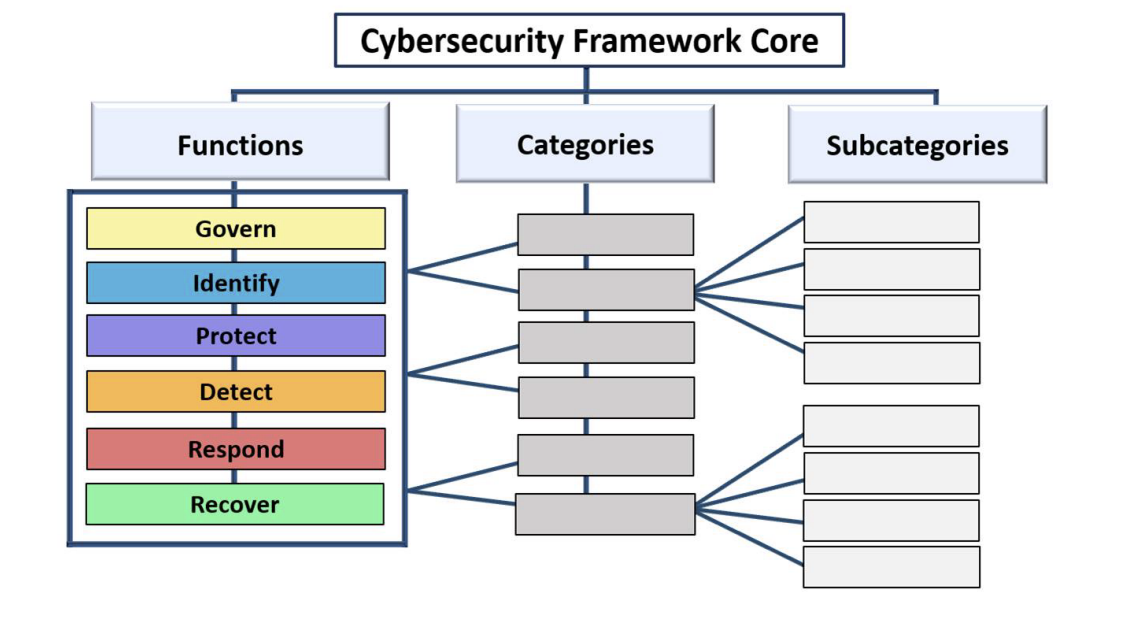
NIST CSF Core Structure, The NIST Cybersecurity Framework (CSF) 2.0
| NIST CSF Framework Layer | Purpose | Example | Count in CSF 2.0 |
|---|---|---|---|
| Function | High-level cybersecurity objective | Protect (PR) | 6 |
| Category | Group of related outcomes | PR.AA Identity Management | 22 |
| Subcategory | Specific cybersecurity outcome | PR.AA-01 Identities are managed | 106 |
The Six Core Functions
CSF 2.0 defines 6 functions: Govern (GV), Identify (ID), Protect (PR), Detect (DE), Respond (RS), and Recover (RC). References to “the 5 NIST CSF categories” describe CSF 1.1, which had 5 functions. As of 2026, CSF 2.0 is the current version of the framework. The update added the Govern function as the sixth, establishing governance as a foundational element of cybersecurity risk management. The 22 categories are distributed across these 6 functions and should not to be confused with the functions themselves.
For a detailed breakdown of how each function works, see our guide to NIST CSF core functions and tiers.
The 22 Categories
Categories sit in the middle layer of the CSF hierarchy, grouping related security outcomes within each function. CSF 2.0 has 22 categories in total: Govern has 6, Identify has 3, Protect has 5, Detect has 2, Respond has 4, and Recover has 2. Each category covers a distinct area of cybersecurity practice, such as asset management, access control, or incident response, and contains the subcategories that define the specific actions organizations need to take. Categories are how the framework translates broad functional objectives into manageable, actionable areas of focus.
Control Identification
Each subcategory follows a consistent naming pattern: Function Code.Category Code-Number. CSF 2.0 has 106 subcategories in total, each with a unique identifier. PR.AA-01, for example, identifies the first subcategory under the Identity Management, Authentication, and Access Control category within the Protect function.
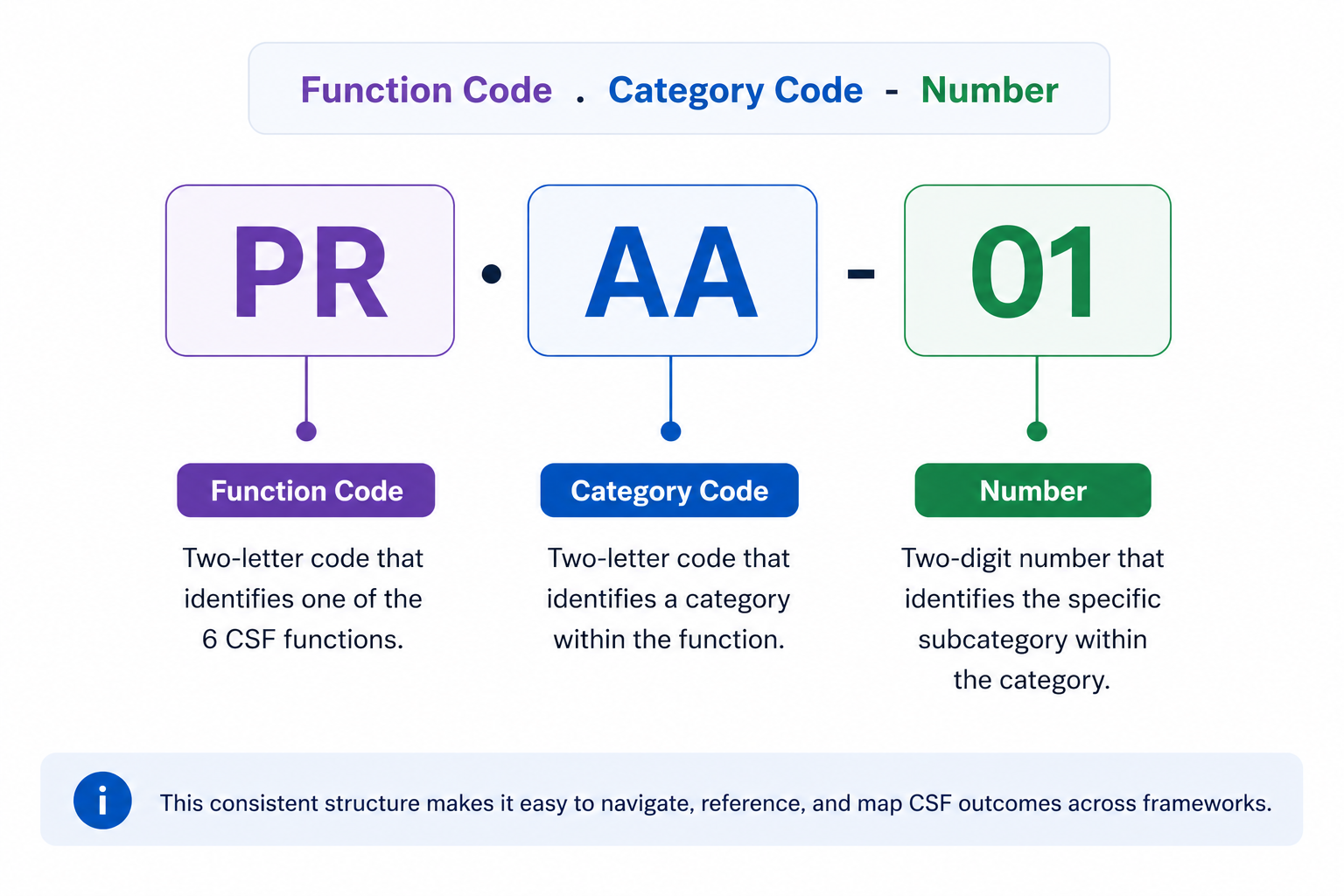
Controls are outcome-based rather than prescriptive, they describe what to achieve, not how to achieve it, explains the NIST CSF 2.0 Resource & Overview Guide. An ISACA analysis of NIST CSF 2.0 hierarchy further notes that CSF 2.0 introduces a clearer organizational role structure, mapping controls to executives, managers, and practitioners for more effective implementation.
Complete NIST CSF 2.0 Controls List
The NIST CSF 2.0 controls list includes 106 subcategories organized across 6 functions and 22 categories, representing the complete set of cybersecurity outcomes the framework addresses.
Security teams typically reference the CSF controls list when mapping frameworks, conducting maturity assessments, building CSF-aligned programs, or translating CSF requirements into operational controls such as NIST 800-53, ISO 27001, or CIS Controls.
| Function | Category Code | Category Name | Subcategories/Controls | Key Control Areas |
|---|---|---|---|---|
| Govern (GV) | GV.OC | Organizational Context | 5 | Organizational mission, stakeholders, regulatory context |
| GV.RM | Risk Management Strategy | 7 | Risk strategy, risk tolerance, risk management approach | |
| GV.RR | Roles, Responsibilities, and Authorities | 4 | Cybersecurity roles, accountability, authority | |
| GV.PO | Policy | 2 | Cybersecurity policies, governance structure | |
| GV.OV | Oversight | 3 | Leadership oversight, cybersecurity performance monitoring | |
| GV.SC | Supply Chain Risk Management | 10 | Vendor security, third-party risk management | |
| Subtotal | 31 | |||
| Identify (ID) | ID.AM | Asset Management | 7 | Hardware, software, systems inventory |
| ID.RA | Risk Assessment | 10 | Threat identification, risk evaluation | |
| ID.IM | Improvement | 4 | Security program improvement processes | |
| Subtotal | 21 | |||
| Protect (PR) | PR.AA | Identity Management, Authentication, and Access Control | 6 | Identity lifecycle, authentication, access permissions |
| PR.AT | Awareness and Training | 2 | Security awareness, workforce training | |
| PR.DS | Data Security | 4 | Data protection, encryption | |
| PR.PS | Platform Security | 6 | Infrastructure and platform security | |
| PR.IR | Technology Infrastructure Resilience | 4 | Infrastructure resilience, service availability | |
| Subtotal | 22 | |||
| Detect (DE) | DE.CM | Continuous Monitoring | 5 | Monitoring systems, anomaly detection |
| DE.AE | Adverse Event Analysis | 6 | Event investigation, impact analysis | |
| Subtotal | 11 | |||
| Respond (RS) | RS.MA | Incident Management | 5 | Incident response coordination |
| RS.AN | Incident Analysis | 4 | Incident investigation | |
| RS.CO | Incident Response Reporting and Communication | 2 | Incident communication | |
| RS.MI | Incident Mitigation | 2 | Containment and mitigation | |
| Subtotal | 13 | |||
| Recover (RC) | RC.RP | Incident Recovery Plan Execution | 6 | Recovery planning and restoration |
| RC.CO | Incident Recovery Communication | 2 | Recovery communication | |
| Subtotal | 8 | |||
| Complete Total | 22 Categories | 106 Subcategories |
How Many Controls Are in NIST CSF 2.0?
NIST CSF 2.0 contains 106 subcategories, commonly called controls, organized across 22 categories and 6 core functions. The official NIST CSF 2.0 Reference Tool provides an interactive way to explore each subcategory and its informative references. For a quick readiness check, the NIST CSF 2.0 Readiness Scorecard provides a 24-question assessment across all six functions.
What Changed from CSF 1.1 to CSF 2.0
The previous version, CSF 1.1, had 5 functions, 23 categories, and 108 subcategories. The most significant change in 2.0 was the addition of the Govern function, which accounts for 31 subcategories covering organizational context, risk management strategy, cybersecurity roles, policy, oversight, and supply chain risk management. Its inclusion reflects a deliberate shift toward stronger governance and clearer organizational accountability for cybersecurity risk. A 2026 UC Berkeley CLTC analysis of 99 state cybersecurity bills enacted in 2025 found that 51% of new statutory rules align to the Govern function, confirming its regulatory prominence.
Beyond Govern, NIST CSF 2.0 reorganized and consolidated existing controls, reducing the category count from 23 to 22, renaming several categories to better reflect their scope, and redistributing some subcategories across functions to simplify the overall framework structure.
The current NIST CSF control breakdown by function is: Govern (31), Identify (21), Protect (22), Detect (11), Respond (13), and Recover (8).
For a deeper look at what changed between NIST CSF 1.1 and 2.0, see our complete guide to NIST CSF 2.0.
The 106 subcategories cover every dimension of cybersecurity risk, but three areas generate the most implementation questions: physical security, access control, and cloud environments. The sections below break down how CSF handles each and where to look within the framework.
NIST CSF Physical Security Controls
NIST CSF distributes physical security controls across multiple functions, mainly Protect and Identify. Organizations looking for physical security coverage should expect to map across several functions rather than a single category.
The table below shows where physical security subcategories appear across the framework.
| Function | Category | Example Controls | Physical Security Application |
|---|---|---|---|
| Protect | PR.AA (Access Control) | PR.AA-05, PR.AA-06 | Physical access management, badge systems, visitor controls |
| Protect | PR.PS (Platform Security) and PR.IR (Infrastructure Resilience) | PR.PS-01, PR.PS-02 PR.IR-02 |
Physical infrastructure protection, environmental protection |
| Identify | ID.AM (Asset Management) | ID.AM-01 | Physical asset inventory, facility identification |
| Detect | DE.CM (Continuous Monitoring) | DE.CM-02 | Surveillance, environmental monitoring, intrusion detection |
| Govern | GV.SC (Supply Chain) | GV.SC-01 through GV.SC-06 | Physical supply chain security, vendor facility assessments |
Organizations needing prescriptive physical security controls can turn to NIST SP 800-53 Rev. 5, which provides the PE (Physical and Environmental Protection) family, a detailed set of controls that map directly to CSF subcategories within PR.AA (Access Control), DE.CM (Continuous Monitoring) and ID.AM (Asset Management).
Identify CSF subcategory requirements first, then use the informative references and the finalized NIST OLIR crosswalk to find the corresponding SP 800-53 PE controls for implementation guidance. For a deeper look at how the two frameworks relate, see our guide to NIST 800-53 vs NIST CSF.
Access control is another high-interest area within NIST CSF that spans both physical and logical domains.
Access Control in NIST CSF
NIST CSF 2.0 addresses access control primarily through the Protect function’s Identity Management, Authentication, and Access Control category (PR.AA), which covers both logical and physical access to organizational assets. In CSF 1.1, this was designated PR.AC (Access Control) and was renamed and expanded in the 2.0 update.
What PR.AA Controls Cover
PR.AA subcategories address the full lifecycle of identity and access management, including:
- Identities and credentials management for authorized users, services, and hardware
- Identity proofing and binding to credentials
- User, device, and service authentication
- Access permissions management including least privilege and separation of duties
- Network access integrity protection through segmentation and traffic filtering
Govern and Framework Mapping
Access control also intersects with the Govern function. GV.RR (Roles, Responsibilities, and Authorities) defines who has access to cybersecurity decision-making, while PR.AA defines who has access to systems and data. This distinction matters for organizations building role-based access control programs that align with CSF outcomes.
The CSF PR.AA subcategories map to multiple NIST SP 800-53 Rev. 5 control families, including AC (Access Control), IA (Identification and Authentication), and PE (Physical and Environmental Protection).
NIST CSF controls apply to cloud environments the same way they do on-premises. Both AWS and Azure provide official mappings that link native services directly to CSF subcategories.
NIST CSF on AWS
AWS publishes an official workbook mapping native services to CSF subcategories, updated for CSF 2.0 in 2024, helping organizations achieve framework alignment in cloud environments. AWS also released an updated NIST CSF 2.0 whitepaper in January 2025 that maps AWS services across all six CSF functions and includes practical implementation guidance for organizations at any stage of their compliance journey.
Key AWS service mappings by CSF function:
| NIST CSF Function | AWS Services | Security Capabilities |
|---|---|---|
| Govern | AWS Organizations, AWS Config, AWS CloudTrail | Policy enforcement, governance oversight, audit logging |
| Identify | AWS Config, AWS Systems Manager, Amazon Inspector | Asset inventory, configuration visibility, vulnerability management |
| Protect | AWS IAM, AWS WAF, AWS KMS, AWS Shield | Identity and access control, encryption, network protection |
| Detect | Amazon GuardDuty, AWS CloudTrail, Amazon CloudWatch | Continuous monitoring, threat detection, anomaly identification |
| Respond | AWS Security Hub, Amazon EventBridge, AWS Lambda | Incident response coordination and automation |
| Recover | AWS Backup, AWS Elastic Disaster Recovery | Backup management and disaster recovery execution |
AWS Audit Manager includes a pre-built NIST CSF assessment framework for automated evidence collection. AWS Config conformance packs provide direct CSF control mapping to AWS Managed Config Rules, making it straightforward to identify gaps and track compliance posture against specific subcategories without manual cross-referencing.
Azure offers a similar set of tools and mappings for organizations using Microsoft’s cloud platform.
NIST CSF on Azure
Microsoft Azure offers a comprehensive NIST CSF compliance blueprint and built-in regulatory compliance tools, helping organizations implement and monitor CSF controls in Azure environments. The Azure NIST CSF compliance documentation details Azure Policy built-in initiative definitions mapped directly to CSF subcategories.
Key Azure service mappings by CSF function:
| NIST CSF Function | Azure Services | Security Capabilities |
|---|---|---|
| Govern | Azure Policy, Microsoft Purview, Azure Governance | Policy enforcement, compliance monitoring, governance oversight |
| Identify | Microsoft Defender for Cloud, Azure Resource Graph | Asset inventory, security posture visibility, risk assessment |
| Protect | Microsoft Entra ID, Azure Key Vault, Azure Firewall, Azure DDoS Protection | Identity management, encryption, network protection |
| Detect | Microsoft Sentinel, Microsoft Defender for Cloud | Threat detection, SIEM monitoring, continuous security monitoring |
| Respond | Microsoft Sentinel (SOAR), Azure Logic Apps | Incident response automation and orchestration |
| Recover | Azure Site Recovery, Azure Backup | Disaster recovery and business continuity |
Microsoft Defender for Cloud includes a NIST CSF compliance dashboard for real-time posture assessment. Organizations can also access the NIST CSF Customer Responsibility Matrix through the Azure Service Trust Portal for detailed shared responsibility documentation.
Beyond cloud platforms, organizations frequently need to map CSF controls to other compliance frameworks, particularly HITRUST.
Mapping CSF Controls to HITRUST
HITRUST CSF incorporates NIST CSF controls as one of its core authoritative sources, making alignment between the two frameworks a common requirement for organizations in healthcare, financial services, and other regulated industries. HITRUST CSF v11.4.0+ maps directly to NIST CSF 2.0 subcategories through the NIST CSF v2.0 Certification Report, an optional add-on to r2 validated assessments. Organizations on HITRUST CSF v11.3.2 or earlier receive NIST CSF v1.1 mapping only. HITRUST’s companion guide for NIST CSF 2.0 provides practical control-selection guidance for implementing CSF 2.0 within the HITRUST framework.
Key mapping areas include:
- HITRUST 01.0 (Access Control) to CSF PR.AA
- HITRUST 06.0 (Regulatory Compliance) to CSF GV.OC and GV.PO
- HITRUST 09.0 (Communications and Operations Management) to CSF PR.PS and DE.CM.
The critical distinction is that NIST CSF is voluntary and outcome-based while HITRUST is prescriptive and certifiable. CSF controls describe what to achieve, while HITRUST specifies how. A FIU survey of major cybersecurity compliance frameworks validates this complementary relationship, noting that outcome-based frameworks like CSF pair effectively with prescriptive frameworks for operational implementation.
HITRUST also maps extensively to NIST 800-53 control families, which provide the prescriptive controls that implement CSF outcomes.
In financial services, OCC Bulletin 2024-25 formally sunset the FFIEC Cybersecurity Assessment Tool (CAT) effective August 31, 2025, directing supervised institutions to adopt NIST CSF 2.0 directly as the replacement framework for cybersecurity self-assessment.
To help with these kinds of mappings, we have created a downloadable CSF controls mapping resource.
NIST CSF Controls Mapping Spreadsheet
Download the NIST CSF Controls Mapping Spreadsheet to map your security controls to CSF 2.0 categories, track implementation progress, and cross-reference related frameworks.
The spreadsheet includes the complete CSF 2.0 subcategory list, mapping columns for NIST 800-53, ISO 27001, and CIS Controls, implementation status tracking, and notes fields for each control. For the official NIST control-level mapping, the CSF-to-SP-800-53 crosswalk spreadsheet provides bidirectional mappings between all 106 subcategories and SP 800-53 Rev. 5 controls.
Start with a gap analysis by marking each subcategory as Implemented, Partially Implemented, or Not Implemented. Then use the crosswalk columns to identify overlap with other framework requirements you may already satisfy. For step-by-step implementation guidance, see the guide to how to implement NIST CSF. For risk assessment methodology, see the NIST CSF risk assessment guide.
Download the NIST CSF Controls Mapping Spreadsheet (Excel)
For a subcategory-level assessment, the NIST CSF 2.0 Self-Assessment Questionnaire provides plain-language questions with evidence fields for distributed teams.
How to Simplify NIST CSF Compliance
Isora GRC maps directly to NIST CSF controls, giving security teams a structured way to assess maturity, track gaps, and manage compliance in one place. Unlike enterprise GRC suites, Isora focuses on information security risk and compliance, with assessments, inventories, risk registers, and reporting streamlined for security practitioners.
- Questionnaires & Surveys: Distribute prebuilt CSF-aligned questionnaires to control owners across departments and track completion in real time. Multiple contributors can add responses, upload evidence, and comment on questions, reducing the time security teams spend coordinating assessment tasks across 106 subcategories.
- Assessment Management: Organize assessments by compliance goal to streamline complex CSF campaigns. Track participation rates, scores, and completion status from one dashboard, with built-in notifications and reminders that keep deadlines on schedule.
- Reports & Scorecards: Generate compliance scorecards aligned to CSF structure and terminology, ready for leadership and regulators. Automated scoring and category comparisons free up time for strategic work, while drill-down into individual responses provides the evidence trail auditors expect.
Learn more about simplifying NIST CSF compliance with Isora GRC.
Key Takeaways
- NIST CSF 2.0 organizes cybersecurity risk management into 106 subcategories (controls) across 22 categories and 6 functions, covering governance, asset visibility, protection, detection, response, and recovery.
- Categories group related controls within each function, giving organizations a structured way to scope assessments, assign ownership, and track gaps.
- CSF controls apply equally across cloud and on-premises environments. AWS and Azure both provide official service mappings to specific CSF subcategories.
- Physical security, access control, and cloud implementation generate the most implementation questions. Each distributes across multiple CSF functions rather than concentrating in a single category.
- HITRUST CSF v11.4.0+ maps directly to NIST CSF 2.0 subcategories, and NIST 800-53 provides the prescriptive controls that implement CSF outcomes.
For a deeper foundation, see the guide to NIST CSF core functions and tiers. To get the complete subcategory list with cross-framework mapping columns, download the NIST CSF Controls Mapping Spreadsheet.
See how Isora simplifies NIST CSF compliance.
NIST CSF Controls FAQs
What are NIST CSF controls?
NIST CSF controls are the specific cybersecurity outcome statements, officially called subcategories, within the NIST Cybersecurity Framework. CSF 2.0 contains 106 controls organized across 22 categories and 6 core functions: Govern, Identify, Protect, Detect, Respond, and Recover. Each control describes a desired security outcome that organizations tailor to their risk profile and environment.
Unlike prescriptive frameworks such as NIST 800-53, CSF controls define what to achieve, not how to achieve it, giving organizations flexibility in implementation.
How many controls are in NIST CSF 2.0?
NIST CSF 2.0 contains 106 subcategories (controls) organized across 22 categories and 6 core functions. CSF 1.1 had 108 subcategories across 23 categories. The change reflects a reorganization and consolidation of existing controls alongside the addition of the Govern function, which introduced 31 new subcategories covering governance, oversight, and supply chain risk. The current breakdown by function is: Govern (31), Identify (21), Protect (22), Detect (11), Respond (13), and Recover (8).
What are the NIST CSF categories?
NIST CSF 2.0 has 22 categories distributed across 6 functions. Each category groups related cybersecurity outcomes within its function. Govern has 6 categories covering organizational context, risk management strategy, roles and responsibilities, policy, oversight, and supply chain risk. Identify has 3, Protect has 5, Detect has 2, Respond has 4, and Recover has 2. References to 23 categories describe CSF 1.1, not the current version.
Does NIST CSF cover physical security?
Yes. NIST CSF addresses physical security controls across multiple functions rather than isolating them in a standalone category. Key physical security controls fall under Protect (PR.AA for physical access control, PR.IR for environmental protection, Identify (ID.AM for physical asset management), and Detect (DE.CM for physical environment monitoring). Organizations needing more prescriptive physical security guidance can use NIST SP 800-53‘s PE (Physical and Environmental Protection) family, which maps directly to these CSF subcategories.
What is the difference between NIST CSF and NIST 800-53?
NIST CSF provides a high-level, outcome-based framework of 106 controls that describe what organizations should achieve. NIST 800-53 provides a detailed catalog of 1,196 prescriptive security and privacy controls that specify how to implement those security measures. The two frameworks are designed to work together: CSF subcategories map to specific 800-53 controls through NIST’s informative references and the finalized OLIR bidirectional crosswalk, so organizations can use CSF to set direction and 800-53 to implement it. For a full comparison, see our guide to NIST 800-53 vs NIST CSF.
Can you use NIST CSF for cloud security?
Yes. NIST CSF controls apply to cloud environments the same way they do on-premises. Both AWS and Azure provide official CSF compliance mappings that link native cloud services to specific CSF subcategories. AWS Audit Manager includes a pre-built NIST CSF assessment framework for automated evidence collection, while Microsoft Defender for Cloud offers a NIST CSF compliance dashboard for real-time posture monitoring. Organizations can use these tools to track CSF control coverage without building mappings from scratch.

This content is for informational purposes only and does not constitute legal or compliance advice. See our full disclaimer.
 Other Relevant Content